> ## Documentation Index
> Fetch the complete documentation index at: https://docs.artaios.ai/llms.txt
> Use this file to discover all available pages before exploring further.
# AI Config Generator
> Create agent configurations in seconds by describing what you want in natural language
The AI Config Generator creates complete YAML configurations from your natural language descriptions. No need to memorize YAML syntax or configuration options—just describe what you want your agent to do in any language.
## What You'll Learn
This guide shows you how to:
* Access the AI Config Generator in Artaios Agents Studio
* Write descriptions that produce good results
* Use generated configurations in your projects
## How to Use the AI Config Generator
In Artaios Agents Studio, click the **✨ Generate Config** button in the top toolbar.
In the modal that appears, describe what you want your agent to do.
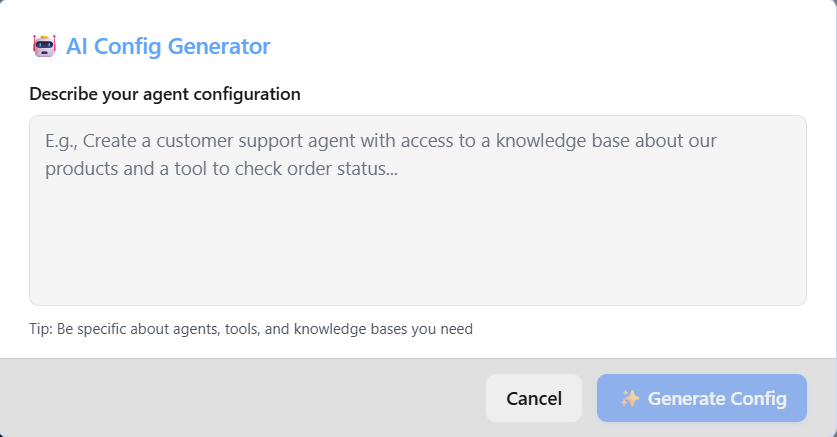 Be specific about:
* What task the agent should perform
* What data it needs to extract or analyze
* What tools it should use (if any)
For example:
```
Build a research assistant that can search the web for information about AI trends,
analyze the findings, and create a comprehensive summary report.
```
Click **Generate Config** and wait a few seconds. The AI will create a complete YAML configuration.
Be specific about:
* What task the agent should perform
* What data it needs to extract or analyze
* What tools it should use (if any)
For example:
```
Build a research assistant that can search the web for information about AI trends,
analyze the findings, and create a comprehensive summary report.
```
Click **Generate Config** and wait a few seconds. The AI will create a complete YAML configuration.
 The generated configuration appears in your YAML editor. Review it, then click **Load Configuration** to test it.
## Writing Good Descriptions
### ✅ Good Examples
**Data Extraction**
```
Analyze customer feedback and extract sentiment, key topics, and actionable insights
```
**Customer Support**
```
Read customer support tickets, classify them as technical, billing, or general,
and route each type to the appropriate specialist agent
```
**Content Review**
```
Review blog posts for quality. If quality is good, approve it.
If quality is poor, send it back for revision.
```
### ❌ Avoid
**Too vague**: "Create an AI agent" — What should it do?
**Too long**: Paragraph after paragraph of requirements — Keep it to 2-3 sentences
**Implementation details**: "Use GPT-4 with temperature 0.7" — Let the AI handle the technical details
## Try These Examples
Copy and paste these into the generator to see what it creates:
### Example 1: Meeting Analyzer
```
Analyze meeting transcripts and extract action items, decisions made, and key discussion points
```
### Example 2: Email Classifier
```
Classify incoming emails as urgent, normal, or low priority based on content and sender
```
### Example 3: Quality Check
```
Review code submissions and check if they meet our standards.
If they pass, approve them. If not, send back with improvement suggestions.
```
## Tips for Best Results
**Be specific about data**: If you need to extract specific information, list the exact fields you want (name, email, address, etc.)
**Mention tools when needed**: If your agent needs to search the web or access a knowledge base, say so in your description
**Describe the workflow**: If you need multiple steps ("first do X, then do Y"), describe them in order
**Start simple**: Generate a basic version first, test it, then add complexity
## Common Issues
**"Not what I wanted"**: Your description might be too vague. Try being more specific about what the agent should do and what data it needs.
**"Too complex"**: The generator created more than you need. Simplify your description to just the core task.
**"Almost perfect"**: You can manually edit the generated YAML to fine-tune it. The generator gives you a solid starting point.
## What's Next?
Now that you can generate configurations:
Learn how to test and run your generated agent
The generated configuration appears in your YAML editor. Review it, then click **Load Configuration** to test it.
## Writing Good Descriptions
### ✅ Good Examples
**Data Extraction**
```
Analyze customer feedback and extract sentiment, key topics, and actionable insights
```
**Customer Support**
```
Read customer support tickets, classify them as technical, billing, or general,
and route each type to the appropriate specialist agent
```
**Content Review**
```
Review blog posts for quality. If quality is good, approve it.
If quality is poor, send it back for revision.
```
### ❌ Avoid
**Too vague**: "Create an AI agent" — What should it do?
**Too long**: Paragraph after paragraph of requirements — Keep it to 2-3 sentences
**Implementation details**: "Use GPT-4 with temperature 0.7" — Let the AI handle the technical details
## Try These Examples
Copy and paste these into the generator to see what it creates:
### Example 1: Meeting Analyzer
```
Analyze meeting transcripts and extract action items, decisions made, and key discussion points
```
### Example 2: Email Classifier
```
Classify incoming emails as urgent, normal, or low priority based on content and sender
```
### Example 3: Quality Check
```
Review code submissions and check if they meet our standards.
If they pass, approve them. If not, send back with improvement suggestions.
```
## Tips for Best Results
**Be specific about data**: If you need to extract specific information, list the exact fields you want (name, email, address, etc.)
**Mention tools when needed**: If your agent needs to search the web or access a knowledge base, say so in your description
**Describe the workflow**: If you need multiple steps ("first do X, then do Y"), describe them in order
**Start simple**: Generate a basic version first, test it, then add complexity
## Common Issues
**"Not what I wanted"**: Your description might be too vague. Try being more specific about what the agent should do and what data it needs.
**"Too complex"**: The generator created more than you need. Simplify your description to just the core task.
**"Almost perfect"**: You can manually edit the generated YAML to fine-tune it. The generator gives you a solid starting point.
## What's Next?
Now that you can generate configurations:
Learn how to test and run your generated agent