> ## Documentation Index
> Fetch the complete documentation index at: https://docs.artaios.ai/llms.txt
> Use this file to discover all available pages before exploring further.
# Variables
> Learn more about using variables in AMAS
# Variables System
The AMAS Variables System provides a powerful way to define, populate, and use dynamic values throughout your agent configurations. Variables can be populated from user inputs, agent structured outputs, or defined with static defaults.
## Overview
Variables enable:
* **Dynamic prompts** - Inject context into agent system prompts using `{{ variables.name }}`
* **Input overrides** - User-provided inputs override variable defaults at runtime
* **Automatic population** - Extract data from agent structured outputs via `variable_assignments`
* **Persistence** - Variables persist across executions when using checkpoints
***
## Defining Variables
Variables are defined in the `variables` section of your configuration:
```yaml theme={null}
variables:
customer_name:
type: "str"
description: "Customer name extracted from conversation"
priority:
type: "str"
default: "medium"
max_retries:
type: "int"
default: 3
```
### Variable Properties
| Property | Type | Default | Required | Description |
| ------------------------- | ------- | ----------- | -------- | ------------------------------------------------------------------------------------------------------------------------------------------------ |
| `type` | string | — | Yes | Data type using BAML type notation: `str`, `int`, `float`, `bool`, `list[str]`, `list[int]`, `dict[str, int]`, `str \| None`, etc. |
| `default` | any | `null` | No | Default value if not provided. Supports template syntax like `{{ variables.key }}`. |
| `description` | string | `null` | No | Human-readable description (shown in UI and playground). |
| `required` | boolean | `true` | No | If `true`, variable must be provided or have a default value. If `false`, a `default` **must** be set — omitting both causes a validation error. |
| `require_every_execution` | boolean | `false` | No | If `true`, variable must be provided on every execution request. Checkpoint values are ignored. |
| `mode` | string | `"replace"` | No | Assignment mode: `"replace"` (overwrite previous value) or `"concat"` (append to existing value). |
| `separator` | string | `" "` | No | Separator string used when `mode="concat"` to join existing and new values. |
If `required` is `false` and no `default` is set, validation will fail with: *"Variable must either be required=True or have a default value set"*.
***
## Variable Lifecycle
Understanding when variables are required is crucial for proper configuration:
### Session-Level Variables
These are required on the **first execution only** and persist via checkpoints:
```yaml theme={null}
variables:
current_user_id:
type: "str"
required: true
description: "User ID (persists after first execution)"
```
When the user provides `inputs: {"current_user_id": "user_123"}`, this value is stored in the variable and persists across subsequent executions.
* Set once at session start
* Persist across all subsequent executions in the session
* Ideal for: user identity, session context, preferences
### Request-Level Variables
These must be provided on **every execution**:
```yaml theme={null}
variables:
current_query:
type: "str"
require_every_execution: true
description: "User's query (must be provided every time)"
```
* Fresh value required for each request
* Checkpoint values are ignored for these variables
* Ideal for: user messages, request-specific data
***
## Providing Inputs
Inputs are values provided at runtime that **override variable defaults**. The input key must match the variable name.
### Via REST API
Send inputs in the request body:
```bash theme={null}
curl -X POST /api/v1/sessions/{session_id}/execute \
-H "Content-Type: application/json" \
-d '{
"message": "Help me with my order",
"inputs": {
"current_user_id": "user_123",
"current_department": "support",
"current_query": "Help me with my order"
}
}'
```
The `inputs` object keys correspond directly to variable names defined in your configuration.
### Via Playground UI
Use the **Variable Inputs** panel to provide values:
1. Click the input field next to each variable
2. Enter the value
3. Variables with `required: true` must be filled before execution
4. Variables with defaults show the default value as placeholder
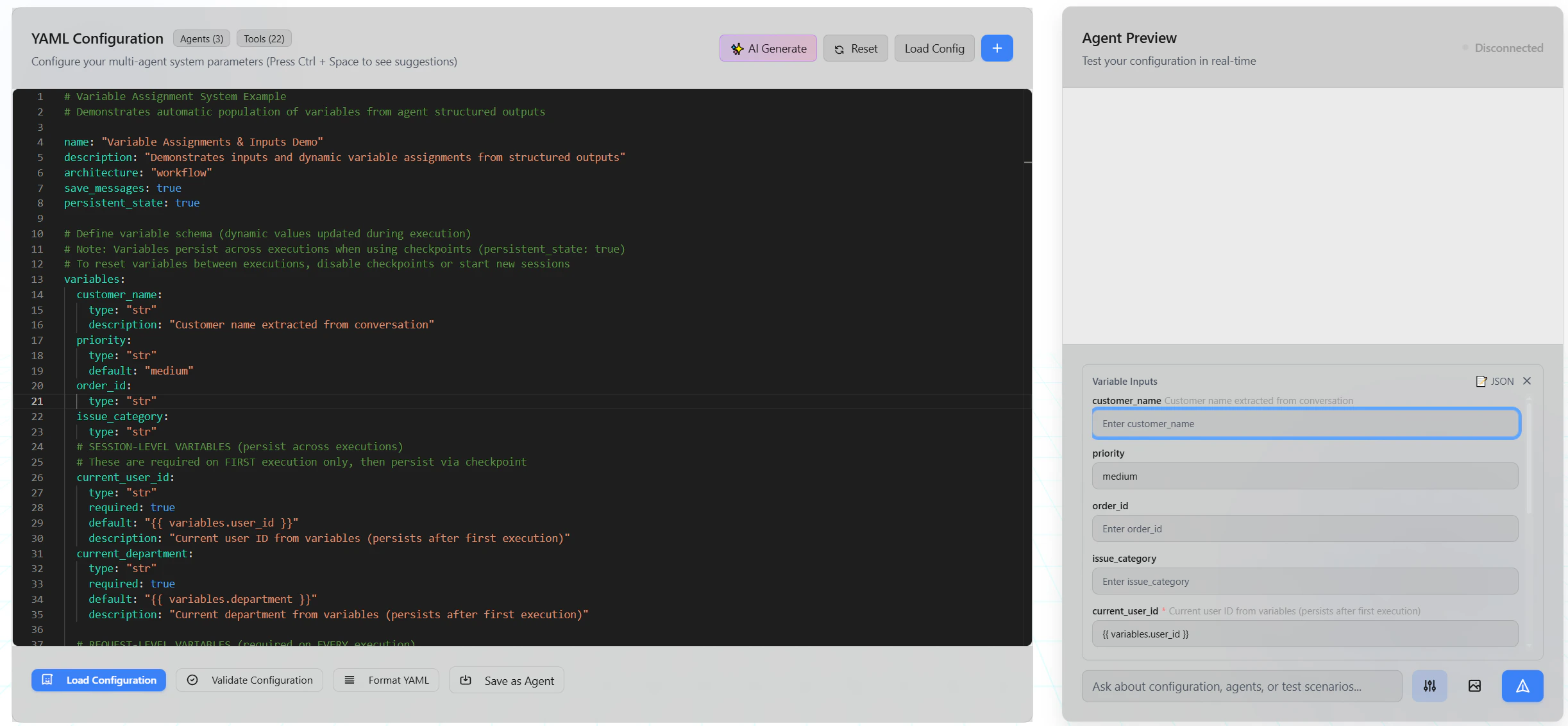 The Variable Inputs panel shows all defined variables with their descriptions and current values.
***
## Using Variables in Prompts
Reference variables in agent prompts using Jinja2 syntax:
```yaml theme={null}
agents:
- name: support_agent
prompt_config:
system_prompt: |
You are a support agent for {{ variables.company_name }}.
Current User: {{ variables.current_user_id }}
Department: {{ variables.current_department }}
Customer Query: "{{ variables.current_query }}"
Customer Name: {{ variables.customer_name }}
Priority Level: {{ variables.priority }}
```
### Template Syntax
Variables are accessed in `system_prompt` using `{{ variables.name }}` syntax. The substitution engine also supports other template variables — see [Prompt Configuration](/documentation/agent_config/types_config/prompt-configuration) for the full list.
| Syntax | Description | Example |
| ------------------------------- | ------------------------------------------ | -------------------------------- |
| `{{ variables.name }}` | Access a variable value | `{{ variables.customer_name }}` |
| `{{ user_input }}` | Current user message text | `{{ user_input }}` |
| `{{ agent_name.output.field }}` | Structured output field from another agent | `{{ analyzer.output.priority }}` |
| `{{ agent_name.output }}` | Last text output from another agent | `{{ researcher.output }}` |
The substitution engine uses regex-based `{{ ... }}` matching, **not** Jinja2 filters. Expressions like `{{ variables.name | default('x') }}` are not supported. Unknown variables resolve to an empty string.
### Reserved Variable Names
The following names cannot be used for custom variables: `user_input`, `history`, `full_history`, `prompts`, `variables`. Using a reserved name causes a validation error.
***
## Variable Assignments
The most powerful feature: automatically populate variables from agent structured outputs.
### How It Works
1. **Agent generates structured output** using `structured_output` configuration
2. **Variable assignments map** output fields to variables
3. **Downstream agents** receive populated variables in their prompts
### Configuration
```yaml theme={null}
agents:
- name: analyzer
structured_output:
enabled: true
schema:
customer:
type: "str"
description: "Customer name mentioned"
priority_level:
type: "str"
description: "Urgency level (low, medium, high, urgent)"
order_number:
type: "str"
description: "Order ID if mentioned"
# Map structured output fields to variables
variable_assignments:
customer_name: "analyzer.output.customer"
priority: "analyzer.output.priority_level"
order_id: "analyzer.output.order_number"
```
### Assignment Patterns
Variable assignments support three patterns:
#### 1. Structured output field (most common)
```yaml theme={null}
variable_assignments:
customer_name: "analyzer.output.customer"
priority: "analyzer.output.priority_level"
```
* `variable_name` — The variable to populate (must be defined in `variables`)
* `agent_name` — The agent that produces the output
* `output` — Fixed keyword
* `field_name` — The field from the structured output schema
#### 2. Non-structured agent output
```yaml theme={null}
variable_assignments:
agent_summary: "summarizer.output"
```
Assigns the text content of the agent's last message. Useful for agents without structured output.
#### 3. Static value assignment
```yaml theme={null}
variable_assignments:
threshold: 0.85
max_retries: 10
greeting: "Hello"
is_active: true
```
Assigns a constant value directly. Type is validated against the variable's declared type.
### Nested Fields
For nested structured output data, use dot-separated paths:
```yaml theme={null}
variable_assignments:
customer_name: "analyzer.output.customer.name"
customer_email: "analyzer.output.customer.email"
```
### Type Coercion
During variable assignment, values are automatically coerced to match the `type` specified in your variable definition. This means you can assign strings from user input or non-structured agent output, and the system will intelligently convert them:
* **Numbers**: Strings like `"42"` become `42` (`int`), `"3.14"` becomes `3.14` (`float`)
* **Booleans**: Strings like `"true"` or `"1"` become `true`; `"false"` or `"0"` become `false`
* **Collections**: Valid JSON strings are parsed into `dict` or `list` types (e.g., `list[str]`)
If type coercion fails, the system safely falls back to the original raw value. This coercion applies seamlessly to dynamic outputs, static values, and the final combined string when using `concat` mode.
### Concat Mode Example
Build a progressive story where each agent adds a sentence:
```yaml theme={null}
variables:
story:
type: "str"
default: "Once upon a time"
mode: "concat"
separator: " "
description: "Story built progressively"
agents:
- name: storyteller
structured_output:
enabled: true
schema:
sentence:
type: "str"
description: "Next sentence in the story"
variable_assignments:
story: "storyteller.output.sentence"
prompt_config:
system_prompt: |
Continue this story with ONE sentence:
{{ variables.story }}
```
**Execution flow:**
* Initial: `"Once upon a time"`
* After run 1: `"Once upon a time there was a brave knight."`
* After run 2: `"Once upon a time there was a brave knight. He embarked on a quest."`
* After run 3: `"Once upon a time there was a brave knight. He embarked on a quest. The journey was perilous."`
***
## Best Practices
### 1. Use Descriptive Names
```yaml theme={null}
# ✅ Good
variables:
customer_email:
type: "str"
description: "Customer's email address for follow-up"
# ❌ Avoid
variables:
ce:
type: "str"
```
### 2. Provide Helpful Descriptions
Descriptions appear in the UI and help users understand what to provide:
```yaml theme={null}
variables:
current_query:
type: "str"
require_every_execution: true
description: "The user's question or request for this interaction"
```
### 3. Set Sensible Defaults
```yaml theme={null}
variables:
priority:
type: "str"
default: "medium" # Reasonable fallback
max_retries:
type: "int"
default: 3
```
### 4. Separate Session vs Request Variables
Clearly distinguish between persistent and per-request variables:
```yaml theme={null}
variables:
# SESSION-LEVEL (comment for clarity)
# Provided once on first execution, then persists
user_id:
type: "str"
required: true
# REQUEST-LEVEL (comment for clarity)
# Must be provided on every execution
current_message:
type: "str"
require_every_execution: true
```
### 5. Validate Required Variables
Use `required: true` for critical session variables:
```yaml theme={null}
variables:
api_key:
type: "str"
required: true
description: "API key for external service (required)"
```
***
## Troubleshooting
### Variable Not Populated
**Symptom**: Variable shows empty or default value in prompt
**Causes**:
1. Agent didn't produce structured output
2. Assignment path is incorrect
3. Field name doesn't match schema
**Solution**: Check the agent's structured output schema matches the assignment path:
```yaml theme={null}
# Schema defines "customer_name"
structured_output:
schema:
customer_name: # ← Field name
type: "str"
# Assignment must match
variable_assignments:
customer: "agent.output.customer_name" # ← Must match schema field
```
### Required Variable Error
**Symptom**: "Required variable 'X' not provided"
**Cause**: Variable with `required: true` wasn't provided in inputs
**Solution**: Provide the variable in your API request or UI:
```json theme={null}
{
"inputs": {
"user_id": "your_value_here"
}
}
```
### Variables Not Persisting
**Symptom**: Variables reset between executions
**Cause**: `persistent_state` not enabled or using new session
**Solution**: Enable checkpoints in configuration:
```yaml theme={null}
persistent_state: true
```
***
## API Reference
### Variable Definition Schema
```yaml theme={null}
variable_name:
type: "str" # Required. BAML type notation.
default: "value" # Optional. Default value.
description: "Human-readable" # Optional. Shown in UI.
required: true # Optional. Default: true.
require_every_execution: false # Optional. Default: false.
mode: "replace" # Optional. "replace" or "concat". Default: "replace".
separator: " " # Optional. Used with mode="concat". Default: " ".
```
### Variable Assignment Schema
```yaml theme={null}
variable_assignments:
var_name: "agent.output.field" # Dynamic: structured output field
var_name: "agent.output" # Dynamic: non-structured output (text)
var_name: 42 # Static: constant value
```
### Execution Request
```json theme={null}
{
"message": "User's question",
"inputs": {
"variable_name": "value"
}
}
```
### Supported Types
All types supported by the BAML type parser:
| Type | Description | Example |
| ---------------- | ---------------------------------- | ------------------- |
| `str` | Text string | `"hello"` |
| `int` | Integer | `42` |
| `float` | Decimal number | `3.14` |
| `bool` | Boolean | `true` |
| `list[str]` | List of strings | `["a", "b"]` |
| `list[int]` | List of integers | `[1, 2, 3]` |
| `dict[str, int]` | Dictionary | `{"a": 1}` |
| `str \| None` | Nullable string | `"hello"` or `null` |
| `Optional[str]` | Nullable string (alternate syntax) | `"hello"` or `null` |
| `Any` | Any type | — |
The Variable Inputs panel shows all defined variables with their descriptions and current values.
***
## Using Variables in Prompts
Reference variables in agent prompts using Jinja2 syntax:
```yaml theme={null}
agents:
- name: support_agent
prompt_config:
system_prompt: |
You are a support agent for {{ variables.company_name }}.
Current User: {{ variables.current_user_id }}
Department: {{ variables.current_department }}
Customer Query: "{{ variables.current_query }}"
Customer Name: {{ variables.customer_name }}
Priority Level: {{ variables.priority }}
```
### Template Syntax
Variables are accessed in `system_prompt` using `{{ variables.name }}` syntax. The substitution engine also supports other template variables — see [Prompt Configuration](/documentation/agent_config/types_config/prompt-configuration) for the full list.
| Syntax | Description | Example |
| ------------------------------- | ------------------------------------------ | -------------------------------- |
| `{{ variables.name }}` | Access a variable value | `{{ variables.customer_name }}` |
| `{{ user_input }}` | Current user message text | `{{ user_input }}` |
| `{{ agent_name.output.field }}` | Structured output field from another agent | `{{ analyzer.output.priority }}` |
| `{{ agent_name.output }}` | Last text output from another agent | `{{ researcher.output }}` |
The substitution engine uses regex-based `{{ ... }}` matching, **not** Jinja2 filters. Expressions like `{{ variables.name | default('x') }}` are not supported. Unknown variables resolve to an empty string.
### Reserved Variable Names
The following names cannot be used for custom variables: `user_input`, `history`, `full_history`, `prompts`, `variables`. Using a reserved name causes a validation error.
***
## Variable Assignments
The most powerful feature: automatically populate variables from agent structured outputs.
### How It Works
1. **Agent generates structured output** using `structured_output` configuration
2. **Variable assignments map** output fields to variables
3. **Downstream agents** receive populated variables in their prompts
### Configuration
```yaml theme={null}
agents:
- name: analyzer
structured_output:
enabled: true
schema:
customer:
type: "str"
description: "Customer name mentioned"
priority_level:
type: "str"
description: "Urgency level (low, medium, high, urgent)"
order_number:
type: "str"
description: "Order ID if mentioned"
# Map structured output fields to variables
variable_assignments:
customer_name: "analyzer.output.customer"
priority: "analyzer.output.priority_level"
order_id: "analyzer.output.order_number"
```
### Assignment Patterns
Variable assignments support three patterns:
#### 1. Structured output field (most common)
```yaml theme={null}
variable_assignments:
customer_name: "analyzer.output.customer"
priority: "analyzer.output.priority_level"
```
* `variable_name` — The variable to populate (must be defined in `variables`)
* `agent_name` — The agent that produces the output
* `output` — Fixed keyword
* `field_name` — The field from the structured output schema
#### 2. Non-structured agent output
```yaml theme={null}
variable_assignments:
agent_summary: "summarizer.output"
```
Assigns the text content of the agent's last message. Useful for agents without structured output.
#### 3. Static value assignment
```yaml theme={null}
variable_assignments:
threshold: 0.85
max_retries: 10
greeting: "Hello"
is_active: true
```
Assigns a constant value directly. Type is validated against the variable's declared type.
### Nested Fields
For nested structured output data, use dot-separated paths:
```yaml theme={null}
variable_assignments:
customer_name: "analyzer.output.customer.name"
customer_email: "analyzer.output.customer.email"
```
### Type Coercion
During variable assignment, values are automatically coerced to match the `type` specified in your variable definition. This means you can assign strings from user input or non-structured agent output, and the system will intelligently convert them:
* **Numbers**: Strings like `"42"` become `42` (`int`), `"3.14"` becomes `3.14` (`float`)
* **Booleans**: Strings like `"true"` or `"1"` become `true`; `"false"` or `"0"` become `false`
* **Collections**: Valid JSON strings are parsed into `dict` or `list` types (e.g., `list[str]`)
If type coercion fails, the system safely falls back to the original raw value. This coercion applies seamlessly to dynamic outputs, static values, and the final combined string when using `concat` mode.
### Concat Mode Example
Build a progressive story where each agent adds a sentence:
```yaml theme={null}
variables:
story:
type: "str"
default: "Once upon a time"
mode: "concat"
separator: " "
description: "Story built progressively"
agents:
- name: storyteller
structured_output:
enabled: true
schema:
sentence:
type: "str"
description: "Next sentence in the story"
variable_assignments:
story: "storyteller.output.sentence"
prompt_config:
system_prompt: |
Continue this story with ONE sentence:
{{ variables.story }}
```
**Execution flow:**
* Initial: `"Once upon a time"`
* After run 1: `"Once upon a time there was a brave knight."`
* After run 2: `"Once upon a time there was a brave knight. He embarked on a quest."`
* After run 3: `"Once upon a time there was a brave knight. He embarked on a quest. The journey was perilous."`
***
## Best Practices
### 1. Use Descriptive Names
```yaml theme={null}
# ✅ Good
variables:
customer_email:
type: "str"
description: "Customer's email address for follow-up"
# ❌ Avoid
variables:
ce:
type: "str"
```
### 2. Provide Helpful Descriptions
Descriptions appear in the UI and help users understand what to provide:
```yaml theme={null}
variables:
current_query:
type: "str"
require_every_execution: true
description: "The user's question or request for this interaction"
```
### 3. Set Sensible Defaults
```yaml theme={null}
variables:
priority:
type: "str"
default: "medium" # Reasonable fallback
max_retries:
type: "int"
default: 3
```
### 4. Separate Session vs Request Variables
Clearly distinguish between persistent and per-request variables:
```yaml theme={null}
variables:
# SESSION-LEVEL (comment for clarity)
# Provided once on first execution, then persists
user_id:
type: "str"
required: true
# REQUEST-LEVEL (comment for clarity)
# Must be provided on every execution
current_message:
type: "str"
require_every_execution: true
```
### 5. Validate Required Variables
Use `required: true` for critical session variables:
```yaml theme={null}
variables:
api_key:
type: "str"
required: true
description: "API key for external service (required)"
```
***
## Troubleshooting
### Variable Not Populated
**Symptom**: Variable shows empty or default value in prompt
**Causes**:
1. Agent didn't produce structured output
2. Assignment path is incorrect
3. Field name doesn't match schema
**Solution**: Check the agent's structured output schema matches the assignment path:
```yaml theme={null}
# Schema defines "customer_name"
structured_output:
schema:
customer_name: # ← Field name
type: "str"
# Assignment must match
variable_assignments:
customer: "agent.output.customer_name" # ← Must match schema field
```
### Required Variable Error
**Symptom**: "Required variable 'X' not provided"
**Cause**: Variable with `required: true` wasn't provided in inputs
**Solution**: Provide the variable in your API request or UI:
```json theme={null}
{
"inputs": {
"user_id": "your_value_here"
}
}
```
### Variables Not Persisting
**Symptom**: Variables reset between executions
**Cause**: `persistent_state` not enabled or using new session
**Solution**: Enable checkpoints in configuration:
```yaml theme={null}
persistent_state: true
```
***
## API Reference
### Variable Definition Schema
```yaml theme={null}
variable_name:
type: "str" # Required. BAML type notation.
default: "value" # Optional. Default value.
description: "Human-readable" # Optional. Shown in UI.
required: true # Optional. Default: true.
require_every_execution: false # Optional. Default: false.
mode: "replace" # Optional. "replace" or "concat". Default: "replace".
separator: " " # Optional. Used with mode="concat". Default: " ".
```
### Variable Assignment Schema
```yaml theme={null}
variable_assignments:
var_name: "agent.output.field" # Dynamic: structured output field
var_name: "agent.output" # Dynamic: non-structured output (text)
var_name: 42 # Static: constant value
```
### Execution Request
```json theme={null}
{
"message": "User's question",
"inputs": {
"variable_name": "value"
}
}
```
### Supported Types
All types supported by the BAML type parser:
| Type | Description | Example |
| ---------------- | ---------------------------------- | ------------------- |
| `str` | Text string | `"hello"` |
| `int` | Integer | `42` |
| `float` | Decimal number | `3.14` |
| `bool` | Boolean | `true` |
| `list[str]` | List of strings | `["a", "b"]` |
| `list[int]` | List of integers | `[1, 2, 3]` |
| `dict[str, int]` | Dictionary | `{"a": 1}` |
| `str \| None` | Nullable string | `"hello"` or `null` |
| `Optional[str]` | Nullable string (alternate syntax) | `"hello"` or `null` |
| `Any` | Any type | — |